Maker Movement and DIY Projects
Maker Movement and DIY Projects have turned hobbyists into builders and curious beginners into confident creators. Whether you’re soldering a Raspberry Pi starter kit, assembling a miniature mechanical clock, or joining a weekend Maker Faire, making teaches practical skills and sparks creative problem solving. This article collects approachable starter projects, clear step-by-step DIY guides, and pointers to supportive maker communities so you can turn ideas into finished projects.
Expect concise tutorials for Raspberry Pi starters, simple mini mechanical builds like a low-cost marble clock or a tiny robotic arm, and tips on choosing tools and parts without overspending. You’ll also find guidance on where to ask questions, how to learn safely, and ways to showcase work locally and online. The tone is practical and encouraging. By the end you should feel ready to pick your first project and join a community that shares parts, feedback, and enthusiasm. Start small, learn deliberately, and enjoy the satisfaction of making something with your hands and your mind.
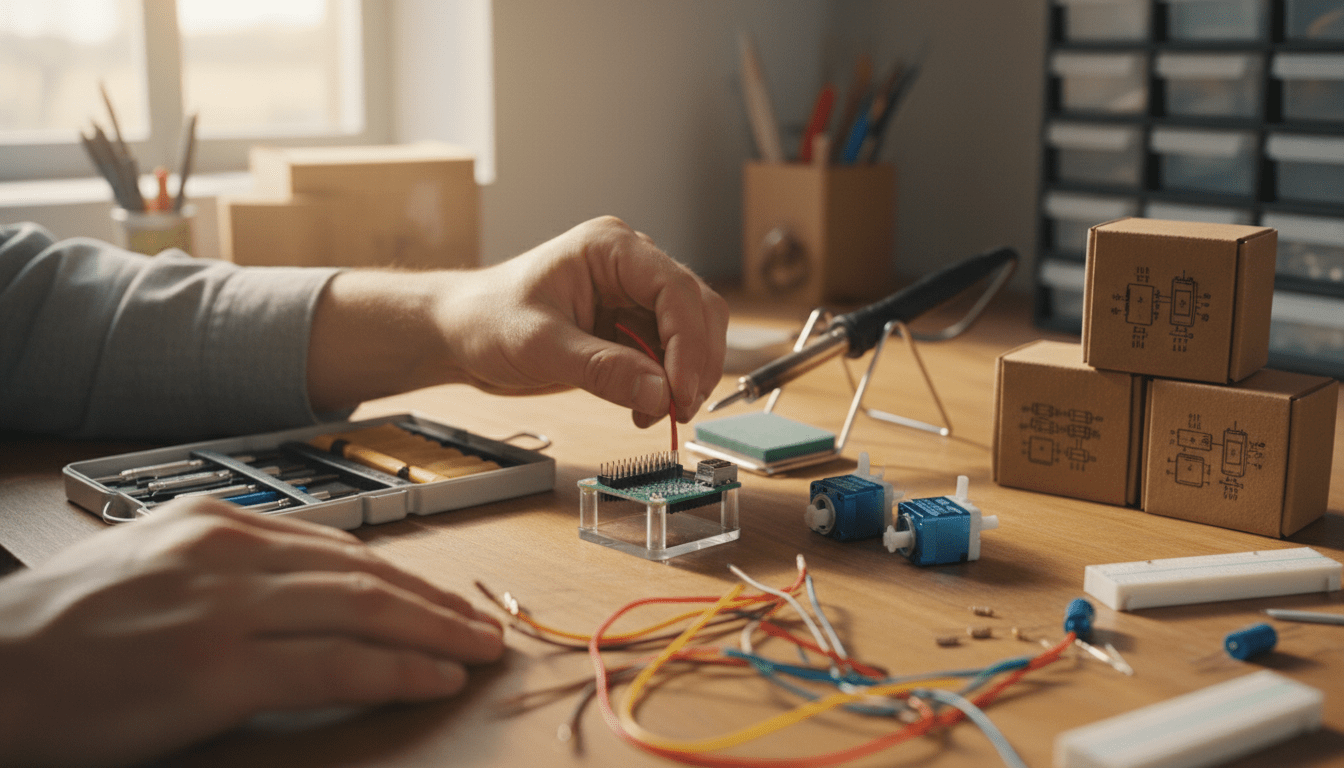
Image description: A warm wooden workbench arranged with beginner maker tools: a Raspberry Pi board, two small micro servos, a soldering iron on its stand, jumper wires, and a compact toolkit. A pair of hands is shown connecting a jumper wire to the Raspberry Pi GPIO header, suggesting hands-on making and creative engagement. The scene uses soft natural light and shallow depth of field to create an inviting, focused composition.
Emerging trends in the Maker Movement and DIY Projects
The maker scene is evolving quickly. New hardware, lower costs, and smarter software make ambitious beginner projects achievable. These trends point to easier entry, faster prototyping, and a stronger sense of collaboration across online and local maker communities.
Raspberry Pi 5 and AI HAT-enabled projects
Single-board computers have moved beyond simple learning boards. The Raspberry Pi 5 delivers noticeably better performance for machine vision and real-time tasks, opening beginner-friendly doors to projects that once required expensive hardware. Paired with compact AI HATs and Raspberry Pi AI Camera modules, newcomers can build security cameras, object-detection rigs, or simple home-automation demos without deep experience in machine learning.
Compact electronics and cheap actuators: mini mechanical builds
Mini mechanical projects remain popular because they teach fundamental mechanics and electronics. Affordable parts like SG90 micro servos let makers assemble marble clocks, tiny robotic arms, and animated displays on a budget. A well-known marble clock build uses micro servos and can be completed for under $23 in parts, making it an ideal weekend project for learners.
Modular kits, 3D printing, and recycled materials
Kits that combine electronics modules and 3D-printable parts reduce friction for beginners. Modular sensors, snap-together frames, and low-cost CNC/3D printing services let hobbyists iterate quickly. E-waste repurposing is also growing: hobbyists salvage speakers, motors, and sensors from discarded gear to make musical instruments and interactive sculptures.
Community-driven growth: Maker Faire, Maker Shed and Make:
Community infrastructure continues to scale. Maker Faire has expanded worldwide, running in nearly 200 locations and drawing large, diverse crowds. Maker Shed remains a key retail and learning resource, supplying kits and parts for new makers. At the same time, Make: has shifted distribution channels to reach readers and projects through platforms like Substack, keeping project stories visible and accessible.
What this means for beginners
Expect more project templates, clearer documentation, and affordable, capable hardware. New tools lower the technical bar and widen the types of projects beginners can try. Join a local makerspace or an online group to get parts, mentorship, and feedback—those connections accelerate learning and make projects more rewarding.
| Project | Estimated cost | Required skills | Tools needed | Time to complete | Key learning outcomes |
|---|---|---|---|---|---|
| Raspberry Pi security camera projects | $50–$150 | Basic Linux, wiring, and networking; beginner Python | Raspberry Pi (4 or 5), camera module or USB webcam, microSD card, power supply, jumper wires, optional soldering iron | 2–6 hours | Basics of Linux, camera streaming, simple scripting, and network setup |
| DIY AI camera setups (AI HAT-enabled) | $80–$250 | Beginner–intermediate Python; familiarity with ML concepts | Raspberry Pi 5 (recommended), AI HAT, camera module, microSD, power, monitor/keyboard, internet connection | 4–12 hours | Running pre-trained models, object detection, inference and deployment basics |
| Marble clock (mini mechanical build) | $15–$40 (many builds < $25) | Basic soldering, assembly, simple electronics, patience | SG90 micro servos, frame materials (wood/3D-printed parts), small hardware, soldering iron, hobby tools | 4–10 hours | Servo control, timing mechanisms, mechanical design and precision assembly |
| Robotic arm kits (servo-based) | $30–$150 | Beginner–intermediate coding, wiring, mechanical assembly | Robotic arm kit, microcontroller or Raspberry Pi, screwdrivers, soldering iron (sometimes optional), jumper wires | 3–8 hours | Kinematics basics, servo control, mapping inputs to motion, simple automation |
Community and learning benefits of the Maker Movement
Joining maker projects delivers practical skills, social support, and long-term learning momentum.
Hands-on skills and problem-solving
Working with physical parts teaches soldering, wiring, carpentry, and basic coding. Troubleshooting projects trains debugging habits and resilient thinking. These skills transfer to careers, hobbies, and other learning.
Confidence and creative agency
Completing a first project builds confidence. Sharing a finished build invites feedback and iteration. As Dale Dougherty put it, “Our goal with Make: over the years is to inspire more people to experience the joys of making and to grow a community that welcomes beginners as well as experts.” That spirit lowers the barrier for newcomers.
Access to tools, mentorship and parts
Local makerspaces, Maker Shed, and online forums provide tools and parts you might not own. Mentors offer quick fixes and safer techniques. Volunteering at events accelerates learning when you help others.
Events and global connection
Community events scale learning rapidly. Maker Faire’s global festivals connect makers across cultures and projects. Seeing diverse builds accelerates idea generation and collaboration.
Joy, wellbeing and lifelong learning
Making provides immediate satisfaction and sustained curiosity. The tactile work can reduce stress and increase focus. Small iterative projects keep learning manageable and rewarding.
How to get started
Visit a local makerspace, join a forum, or attend a regional Maker Faire. Begin with a low-cost kit and ask for help. Share progress publicly to receive feedback and open new opportunities.
Conclusion
The Maker Movement and DIY Projects offer more than finished gadgets — they open a pathway to practical skills, creative confidence, and sustained play. Starting a simple Raspberry Pi build or a mini mechanical clock can turn an afternoon into a hands-on lesson in electronics, mechanics, and iterative problem solving. The real value is the process: learning by doing, sharing progress, and improving through community feedback.
If you feel unsure where to begin, choose a low-cost kit, follow a clear tutorial, and ask questions in a makerspace or online forum. Attend a local Maker Faire or browse Maker Shed resources to see what others are building and gather inspiration. Small projects stack into larger capabilities quickly when you iterate and collaborate.
For curated project ideas, clear guides, and inspiration for turning free time into purposeful play, visit LeisureQuest. LeisureQuest’s mission is to help people transform spare hours into engaging quests of exploration, play, and learning—exactly the mindset that fuels successful making. Start small, stay curious, and enjoy the satisfaction of creating something with your own hands.
Frequently Asked Questions (FAQs)
-
How do I pick a first project that won’t overwhelm me?
Choose a project with a clear parts list and step-by-step guide—look for “beginner” tags. Raspberry Pi offers guided pathways for first builds: Raspberry Pi Pathways. Start with a 2–6 hour project and learn one new skill at a time.
-
How can I avoid common soldering and wiring mistakes?
Practice on a soldering kit and follow Adafruit’s soldering tutorial: Adafruit Soldering Tutorial. Use jumper wires and breadboards for prototyping before committing to soldered connections.
-
What safety precautions should I follow?
Work in a ventilated area, wear eye protection when cutting or drilling, and unplug power before wiring. Keep a basic first-aid kit and a fire extinguisher nearby when using heat tools.
-
How do I manage parts, tools, and costs?
Start with kits that include compatible parts. Use community tool libraries or makerspaces to borrow equipment and avoid large upfront purchases: Community Tool Libraries.
-
Where can I find step-by-step tutorials and help?
Use trusted maker learning hubs: Adafruit Learn, SparkFun Tutorials, Make:, and Instructables. For in-person events and demos, see Maker Faire.
-
How do I get feedback while learning?
Share short progress updates and specific questions in project threads on the sites above or join local maker groups. Focused feedback (e.g., a photo of wiring or a short error message) helps others give actionable advice and keeps your project moving forward.