Reusable Smart Notebook: A Practical, Sustainable Productivity Upgrade
If you’ve ever wanted a single tool that blends old-school note-taking with modern convenience, the Reusable Smart Notebook is worth a look. I started using one to clear paper clutter and streamline weekend project planning. It writes like a notebook, scans to an app, and wipes clean for reuse—so you keep momentum without wasting supplies. Its rising popularity comes from combining productivity features with sustainability: fewer disposable pages, fewer apps, and a simpler workflow. For busy DIYers, students, and home organizers, it fits neatly into a lifestyle focused on efficiency.
This guide will show practical uses, quick setup tips, and real-world ways the notebook speeds projects and reduces waste. Expect actionable advice, brief product notes, and honest impressions that help you decide if this low-cost, eco-friendly productivity hack belongs on your workbench. I’ll also compare top models and suggest the best pens and cleaning tricks.
Reusable Smart Notebook: Features that make it useful
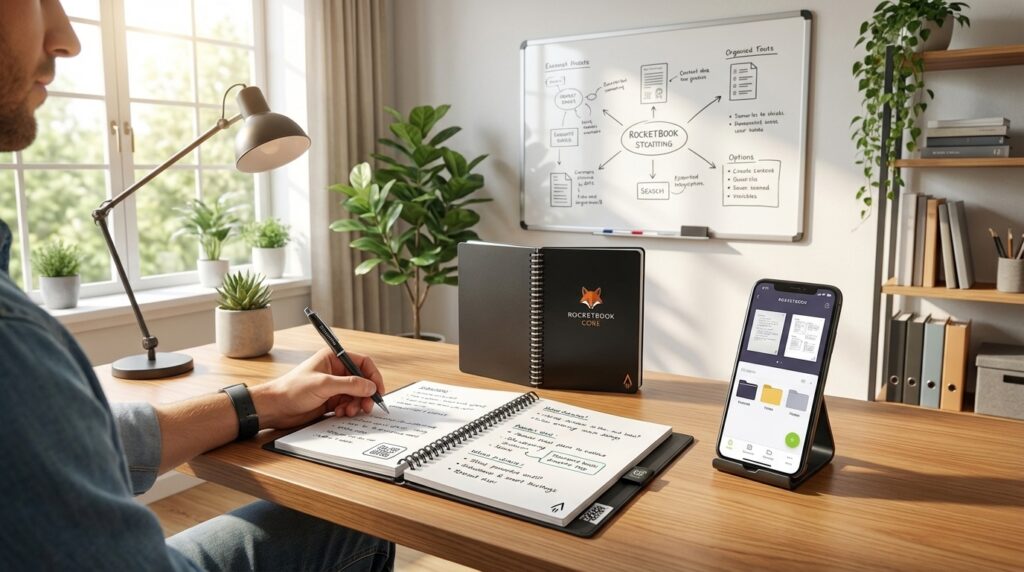
The Reusable Smart Notebook blends tactile note-taking with digital organization. Pages use a whiteboard-like material that accepts erasable ink and wipes clean with a damp cloth. That surface makes the notebook durable for repeated use and ideal for quick sketches, shopping lists, or weekend project plans.
Key features
- Whiteboard material: pages mimic a small whiteboard. Marks erase cleanly without ghosting when you use the right erasable pen.
- Erasable pen compatibility: use heat-sensitive gel pens (commonly Pilot FriXion-style) or the pen recommended by the manufacturer for reliable erasing.
- App integration: companion apps scan pages, auto-crop images, and upload them to cloud services. Scans are fast, clear, and saved as searchable PDFs or images.
- Smart tags and digital organization: assign smart tags or destination markers during capture to route notes automatically to folders or apps like Google Drive, Dropbox, and OneNote.
- Model example — Rocketbook Core: a widely used option that demonstrates these features in an affordable package.
Benefits for productivity and home organization
- Reduce paper clutter while keeping a persistent digital record of notes and sketches.
- Speed up weekend DIY workflows: jot a shopping list, scan it, and erase the page for the next project.
- Improve retrieval: smart tags let you find notes by project, room, or task without manual filing.
- Backup and share: scanned pages sync across devices, making collaboration with partners or contractors easier.
Real-user perspective
Daniel Oropeza sums up the practical value: “I tried it out, and now it has replaced all my productivity apps and my paper notebooks.” He also notes affordability: “It’s super affordable, only costing me around $24.” These comments highlight why this productivity hack appeals to DIYers focused on efficiency and sustainability.

Image credits: LeisureQuest (generated)
Practical uses: Reusable Smart Notebook in projects and home organization
Treat the notebook as a live workspace, not a permanent archive. Use a fresh page for each short task and scan it as a snapshot. Then erase and reuse the page. That keeps your desk tidy while building a searchable digital history.
Everyday examples
- Weekend painting: sketch wall dimensions, note paint codes, and list materials. Scan to a “Painting” folder and erase the page when you finish touch-ups.
- Quick home repairs: record measurements, screw sizes, and replacement part links. Send the scan to your phone and forward to a hardware store or partner.
- Electronics prototypes: draw circuit layouts, label pins, and timestamp each revision. Save scans with version tags (v1, v2) for rollback.
- Meal planning and grocery runs: write one-day menus, scan to a shared grocery list, then wipe the page for next week.
Productivity hacks and workflows
- Capture-and-reset ritual: before starting a task, write three outcomes. Scan after completion, tag by project, then erase. It reinforces focus and produces a record.
- Consistent naming scheme: include date and short project code when scanning (e.g., 2026-04-15_PAINT-LR). This speeds retrieval in cloud folders.
- Automated routing: create smart-tag destinations for common workflows. Route shopping lists to a shared Drive folder and repair notes to a contractor email.
- Weekly project review: keep one page per active project. Scan the week’s pages into a single PDF to create a progress snapshot.
Erasable pen and quick-cleaning tips
- Use the recommended erasable pen for best results. Write with moderate pressure to avoid ghosting.
- Avoid heat-sensitive ink near hot surfaces; it can fade unintentionally.
- For routine cleaning, use a damp microfiber cloth and light circular motion. For stubborn marks, dampen with warm water and a drop of mild soap.
- If faint ghosting appears, re-scan before erasing or use a cotton swab with isopropyl alcohol sparingly.
These practical routines turn the Reusable Smart Notebook into a true productivity hack. It accelerates small tasks and keeps your home organization lean, visual, and easy to share.
| Feature | Rocketbook Core (Reusable Smart Notebook) | Traditional Paper Notebook |
|---|---|---|
| Cost | ~$24 one-time; low ongoing pen/cleaning cost | $2–$10 per notebook; repeated purchase |
| Environmental impact | Low waste: reusable pages reduce paper use | Higher waste: single-use paper contributes to landfill |
| Feature set | Whiteboard material pages; erasable pen compatible; smart tags; scan-to-cloud | Simple paper pages; varied paper quality; no digital features |
| Reusability | High — wipe clean and reuse pages | Single-use — tear or recycle after full |
| App integration | Built-in app integration for digital organization and smart tags | None (requires separate scanning app) |
| Ease of use | Fast capture, erase, and reset; slight learning curve for tags | Immediate pen-and-paper familiarity; manual filing for organization |
Conclusion
The Reusable Smart Notebook brings practical innovation to everyday workflows. It reduces paper waste, speeds capture-and-share routines, and bridges paper habit with digital organization. For DIYers and home organizers, it means clearer workspaces and faster project handoffs. Its whiteboard-like pages, app integration, and smart tags make saving, finding, and sharing notes simple.
Beyond features, the real value is behavioral: writing, scanning, then erasing encourages iteration without clutter. That small shift saves time and storage. Pair it with an erasable pen and a quick-clean routine to get the best results.
LeisureQuest curates tools and ideas that invite exploration, play, and ongoing learning. Our goal is to help you choose tools that free time for hands-on projects. The Reusable Smart Notebook fits that mission by empowering efficient, sustainable habits you can use every weekend.
Explore more gear and short DIY guides at LeisureQuest to find practical recommendations that match your projects and curiosity.
Frequently Asked Questions (FAQs)
What is a Reusable Smart Notebook and how does it differ from a regular notebook?
A Reusable Smart Notebook combines erasable, whiteboard-like pages with digital capture. You write on pages, scan with a companion app, then wipe pages clean for reuse. Unlike single-use paper notebooks, it creates a persistent digital archive while cutting paper waste. Models like the Rocketbook Core show this approach in an affordable format.
How does scanning and app integration work?
The notebook pairs with a scanning app that auto-crops and enhances page images. Use smart tags or destination markers to route scans to Google Drive, Dropbox, OneNote, email, or other services. Scans save as PDFs or images. OCR and searchability depend on the app settings and language support.
How do I clean the pages and avoid ghosting?
For daily cleaning, use a damp microfiber cloth with light pressure. For stubborn marks, add warm water and a drop of mild soap. Isopropyl alcohol on a cotton swab removes stubborn ghosting sparingly. Avoid abrasive cleaners and keep the notebook away from heat, which can affect heat-sensitive inks.
How much does it cost and is it worth it?
Entry models, such as the Rocketbook Core, cost around $24. Factor in low ongoing costs for pens and occasional cleaning supplies. For frequent note-takers and DIYers, the reusable model often pays back its initial cost through reduced paper purchases and faster workflows.
Which pens should I use and how long will the notebook last?
Use the manufacturer-recommended erasable pen or heat-sensitive gel pens like Pilot FriXion. Replace ink when writing fades. With proper care, pages should last years. Lifespan depends on cleaning frequency and storage conditions.