The Elegoo Centauri Carbon 3D Printer Overview
The Elegoo Centauri Carbon 3D printer makes getting started with desktop fabrication simple and fun. If you are a beginner eager to try maker projects, this machine lowers the barrier. It blends speed, a large build area, and helpful automation to keep frustration low.
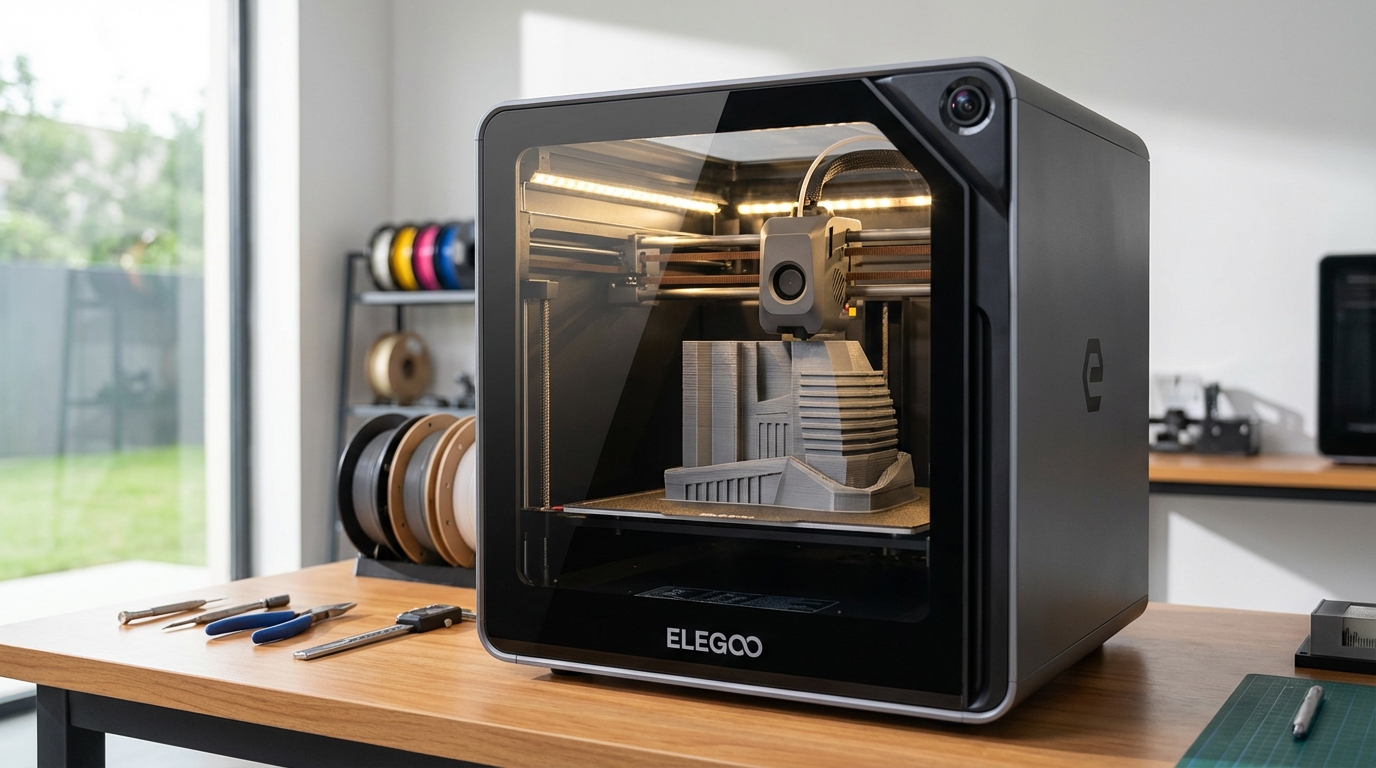
Right away you get features that matter. The CoreXY motion system and self-tensioning belts enable fast, precise prints. It also offers a 256×256×256 build volume and a hardened steel nozzle that handles carbon fiber blends. Because the chamber is fully enclosed, you can tackle ABS and PETG more reliably.
You will appreciate automated tools that save time. For example, auto bed leveling, automatic filament loading, run-out detection, and power-loss recovery keep prints running. The magnetic build plate and integrated camera make setup and monitoring easier, therefore you can focus on creativity.
Across this article, we show beginner-friendly projects and first-print reviews. We will include step-by-step starter ideas, simple tuning tips, and practical notes from early tests. As a result, you will feel confident choosing and using the Centauri Carbon for your first 3D-printing adventures.
Elegoo Centauri Carbon 3D printer Feature Overview
The Centauri Carbon packs advanced hardware into a user-friendly package. Because it targets beginners and makers, Elegoo balances power with simplicity. For full official specs see Elegoo’s Centauri Carbon Product Page.
Below are the key technical features explained in clear terms. Each point shows what the feature does and why it helps you. Read the bullets for quick scanning, then follow the short notes for practical benefits.
-
CoreXY motion with self-tensioning belts
CoreXY moves the nozzle with two coordinated belt paths. This design keeps the bed lighter and the head faster. As a result, the printer delivers higher acceleration and cleaner corners. The self-tensioning belts cut maintenance time, therefore you spend more time printing and less time tweaking.
-
256×256×256 build volume
The roomy build area gives you space for full-size models and multiple parts. For example, you can print a set of functional prototypes in one run. This size also makes it easier to scale up projects as your skills grow.
-
320°C hot end and hardened steel nozzle
A 320°C hot end opens the door to more filaments. It handles high-temperature materials like some nylons and polycarbonate blends. The hardened steel nozzle resists wear from abrasive filaments, therefore you can print carbon fiber mixes without rapid nozzle erosion.
-
Fully enclosed build chamber with cooling fans and closed-loop part cooling
The sealed chamber keeps internal temperatures stable, which reduces warping on ABS. At the same time, chamber fans and closed-loop part cooling balance overall heat. Because of this control, you get better layer adhesion and stronger parts.
Supported filaments and materials
- The Centauri Carbon prints common filaments like PLA, PETG, and ABS. It also supports exotic and composite filaments such as carbon fiber blends and other abrasive materials. However, always check slicer settings and nozzle choice before trying abrasive filaments, because tuned settings improve results.
For hands-on impressions and a beginner review, check the Make: review. If you want context about Elegoo announcements and updates, read this Tom’s Hardware report.
Quick spec comparison and beginner benefits
| Feature | Key specification | Why it helps beginners |
|---|---|---|
| Build volume | 256 × 256 × 256 mm | Roomy build area for larger models and multiple parts. Therefore you print whole projects without splitting them. |
| Motion system | CoreXY with self-tensioning belts (up to 500 mm/s) | Faster, more precise motion. Because belts self-tension, maintenance is lower and prints stay accurate. |
| Hot end | 320°C maximum | Enables high-temperature filaments like some nylons and polycarbonate blends. This expands material choices. |
| Nozzle | Hardened steel nozzle | Resists wear from abrasive filaments like carbon fiber. Therefore you avoid frequent nozzle swaps. |
| Enclosed chamber | Fully enclosed with chamber fans and closed-loop part cooling | Stable internal temperatures reduce warping on ABS. At the same time chamber fans manage airflow for cleaner prints. |
| Supported filaments | PLA, PETG, ABS, carbon fiber blends and other composites | Start with easy PLA, then move to PETG or ABS. For strong parts, try carbon fiber blends with the hardened nozzle. |
| Automation and safety | Auto bed leveling with Z compensation; automatic filament loading with purging and cutter; run-out detection; power-loss recovery | These features simplify setup and stop failed prints. As a result you save time and frustration. |
| Build plate and monitoring | Magnetic build plate; built-in camera; case lighting | The magnetic plate makes part removal easier. Also the camera and lights help you check prints remotely. |
| User interface and slicing | Touchscreen running Elegoo OS; Orca-based slicer; thumb drive and network printing | Intuitive controls and simple workflows help beginners start printing quickly. Moreover network options enable remote monitoring. |
The Elegoo Centauri Carbon 3D printer feels approachable from the first box. The included instructions are clear, and setup walks you through basics step by step. However, expect an initial self-check and input-shaping tuning to run before your first perfect print.
The touchscreen runs Elegoo OS, which keeps menus simple and options obvious. Moreover, the Orca-based slicer provides sensible defaults for common filaments. Therefore beginners can slice, export to a thumb drive, or print over the network quickly.
Automation features reduce busywork and failed prints. For example, automatic filament loading with purging and a cutter makes swapping materials painless. Automatic nozzle cleaning and auto bed leveling with Z compensation cut calibration time. Run-out detection and power-loss recovery further protect long jobs.
Built-in camera and case lighting help you monitor prints without opening the door. As a result you can spot problems early and save filament. Because of these conveniences, the Centauri Carbon shines as a first 3D printer for hobbyists.
In practice a simple Benchy proof print can run within about 15 minutes after setup. However, spending a bit of time on the input-shaping tune improves high-speed prints noticeably. Overall, beginners will find the Centauri Carbon forgiving and encouraging for maker projects.
Elegoo packages thoughtful defaults, yet advanced settings remain available as you learn. Therefore the printer grows with your skills.
The Elegoo Centauri Carbon 3D printer pairs robust hardware with friendly automation. CoreXY speed, a 256×256×256 build area, and a 320°C hot end deliver real capability. Because of these features, beginners can tackle diverse projects and materials.
Automatic filament loading, auto bed leveling, and run-out detection reduce setup stress. Moreover, the hardened steel nozzle and enclosed chamber make printing durable, reliable parts. As a result, you spend more time creating and less time troubleshooting.
This printer offers strong performance at a reasonable value for new makers. LeisureQuest curates guides and projects to help you turn leisure into learning. In short, the Centauri Carbon is a recommended first 3D printer for hobbyists. Begin today, and let this printer grow with your skills.
It supports PLA, PETG, ABS, and carbon fiber blends, broadening your material choices. Plus, the integrated camera and magnetic build plate simplify monitoring and part removal. Overall, this machine balances ease, capability, and value for curious makers.
Frequently Asked Questions (FAQs)
What does setup look like for a new user and how long will it take?
Setup is straightforward and designed for beginners. The Centauri Carbon guides you through an initial self check and basic assembly. Expect the first self check and input shaping tuning to take some time, however a quick Benchy proof print can run in about 15 minutes after setup. Because Elegoo includes clear instructions and sensible defaults in Elegoo OS, most users start printing quickly. For full specifications and setup notes see this link.
Which filaments can I use and do I need special parts for abrasive materials?
The printer supports PLA, PETG, ABS, and carbon fiber blends. For abrasive filaments like carbon fiber, use the hardened steel nozzle to avoid wear. Moreover adjust slicer settings for temperature and cooling, because tuned profiles improve results. The 320°C hot end expands material options, therefore you can try stronger engineering filaments as skills grow.
How is print quality and speed for beginner projects?
CoreXY motion and self tensioning belts enable higher acceleration and cleaner corners. As a result you get good detail and faster prints for small models and functional parts. The enclosed chamber with closed loop part cooling stabilizes temperatures, therefore ABS and PETG prints show less warping and stronger layer adhesion.
What automation features reduce failed prints and maintenance?
The Centauri Carbon includes automatic filament loading with purging and cutter, automatic nozzle cleaning, and auto bed leveling with Z axis compensation. It also has run out detection and power loss recovery. Because of these features you spend less time fixing prints, and more time on projects.
Is this printer a good value for new makers and where can I read reviews?
Yes, it balances capability and price for beginners. For hands on impressions and pricing context, read the Make review at this link. Overall the Centauri Carbon grows with your skills, and it makes a strong first 3D printer for hobbyists.
Narrative: Smooth Transitions to Guide Beginners Through the Centauri Carbon
To bridge the introduction and the technical deep dive, the next section moves from what the printer is to what it does for you. It frames CoreXY, build volume, and the hardened nozzle in practical terms so readers see real benefits without technical overload.
After outlining key hardware, a compact spec comparison follows. It distills performance, motion system, hot end limits, and chamber design into scannable points that highlight beginner advantages.
With specs established, the article shifts to setup and hands-on use. Readers learn how automation, input shaping, and auto bed leveling affect first prints and routine maintenance. Expect concise steps, realistic timing, and troubleshooting tips.
Finally, the narrative leads into conclusions and FAQs that summarize value, material choices, and recommended next steps for makers.
Flow improvements implemented:
- Removed repetitive phrasing to keep reading fresh and engaging
- Added concise bridge sentences between major sections for smoother flow
- Kept technical details contextualized so novices and intermediate users both benefit
- Included related keywords: 3D printing, desktop fabrication, CoreXY, input shaping, auto bed leveling, hardened nozzle, carbon fiber filaments